MTA TrainTime
- 4.6
- Rating
- 1.00M
- Installs
- Free
- Price

 Analysis by App-foxy
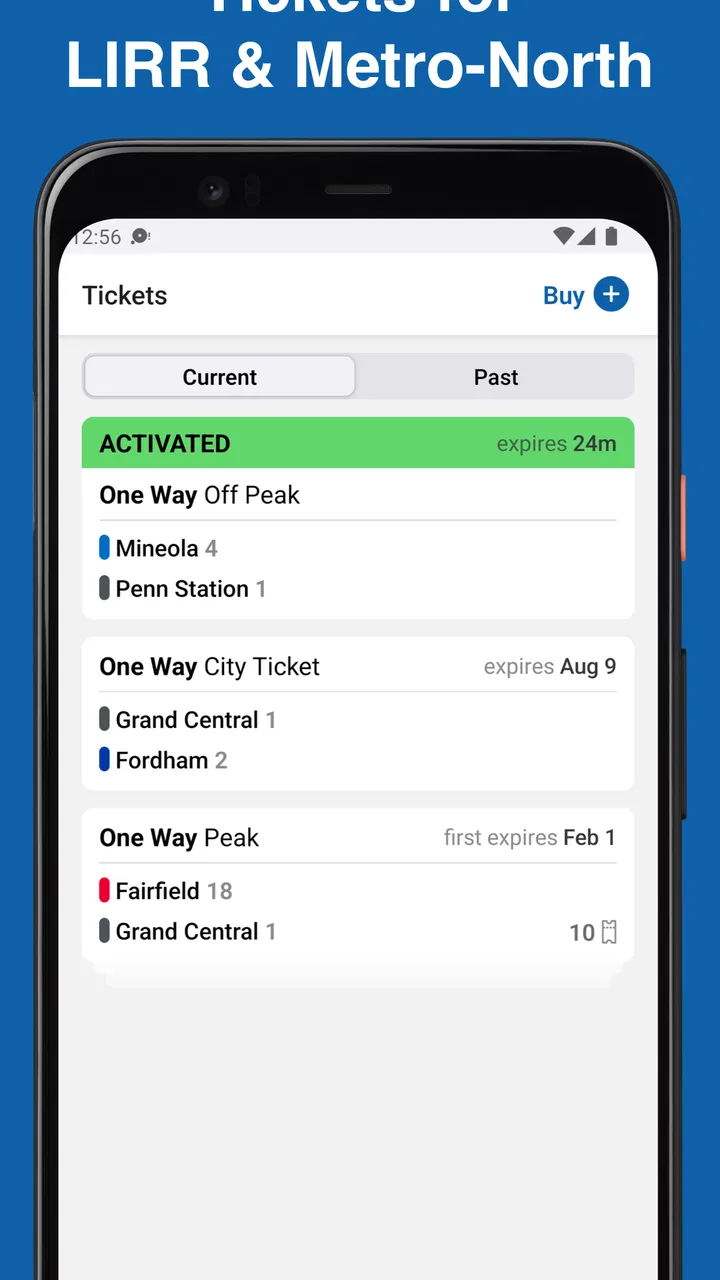
For a first-time rider, buying a commuter-rail ticket can feel more complicated than the journey itself. MTA TrainTime is designed to make that part easier for people using Long Island Rail Road and Metro-North services. I found its purpose refreshingly focused: it brings trips and tickets into one place instead of asking you to piece together travel information and payment steps through unrelated tools.
The app comes from MTA, the Metropolitan Transportation Authority, and sits in the Maps & Navigation category. It is free to use and has an Everyone content rating, so it is suitable for a broad audience. With an average rating of 4.7 from around 28 thousand ratings and more than a million installs, it has clearly become a familiar option for many riders rather than a niche experiment.
That popularity should not lead you to expect a complete replacement for every travel app, though. My impression is that TrainTime works best when your trip specifically involves LIRR or Metro-North. If you need a broad city-navigation tool covering buses, walking directions, cycling, and unrelated operators, a general maps app will still be more useful. TrainTime earns its place by concentrating on the railroad tasks that matter before and during a ride.
You May Also Like

 Blood Strike: 2.5 Anniversary
Blood Strike’s Loadouts Turn Every Drop Into a Tactical Gamble
A close look at Blood Strike’s custom loadouts: how fast access to signature weapons reshapes its battle royale rhythm, rewards preparation, and narrows the gap between fights.

 Pandora - Music & Podcasts
Pandora’s Music Is Easy to Start, but Harder to Recover
Pandora’s strength is its low-effort path from a seed to a station. Its weak spot is how much confidence it asks you to place in connection, setup, and quiet recovery.

 8 Ball Pool
 Is Built on Rivalries, Rematches, and Routine
A close look at the rivalries, rematches, shared routines, and unanswered safety questions that turn a quick pool match into a persistent mobile community.

 Samsung Music
’s Quiet Strength Is Playing What You Already Own
Its reach comes less from spectacle than from dependable access to a personal library. That simplicity is both the app’s strongest retention engine and its ceiling.

 AccuWeather: Weather Radar
AccuWeather Review: A Quick, Clear Forecast for Everyday Decisions
For everyday plans, the best forecast is the one you can understand quickly. AccuWeather makes rain timing, radar, and local conditions easy to act on, with a few trade-offs.

 Hill Climb Racing
Why Hill Climb Racing Still Turns Crashes Into One More Run
A tiny car, a bumpy hill and one more upgrade: Hill Climb Racing keeps resurfacing because its simple chaos makes every near-miss feel personal.
More From Our News Desk



Getting from installation to a useful first trip
I’d use the first trip to learn the sequence without the pressure of a departure clock: choose a familiar station pair, check the railroad and direction, then follow the ticket steps carefully. That gives you a practical baseline for judging whether the workflow suits you, and it makes it easier to spot what deserves a closer look before relying on it for a real commute.
What the app is really for
The store summary describes LIRR and Metro-North tickets and trips, and that is the right way to understand the app. It is not simply a map with train lines drawn across it. The useful question is not only “Where is the station?” but also “How do I plan this railroad trip and handle the ticket?” That narrower focus makes the experience more relevant when you already know that your transportation choice will be one of these two rail systems.
I would recommend installing it before the day you need to travel, especially if you are unfamiliar with the station or the ticket process. The first meaningful success is not merely opening the app; it is reaching the point where you can identify a suitable trip and understand what ticket action you need to take. Doing that calmly at home is much better than trying to learn the interface while standing on a platform.
The current release is version 10.0.13, and the app supports devices running Android 7.0 or later. That makes it accessible to people who keep an older phone for travel, although the practical experience will still depend on the condition and speed of the device. Since it is free, there is little downside to testing it ahead of time rather than waiting until a busy commute.
How I would approach the first setup
After installing, I would begin by treating the app as a trip-and-ticket workspace rather than tapping through every screen without a goal. Start with a journey you actually expect to make. Choose the relevant railroad context, enter the stations or travel details the app requests, and look for the trip that matches your intended departure. This gives each screen a clear purpose and makes unfamiliar labels easier to understand.
Keep your first test simple. A straightforward station-to-station journey is better than immediately experimenting with a complicated itinerary involving several changes. You want to learn where the app presents trip information, where ticket actions appear, and what confirmation looks like. Once those pieces make sense, a more involved journey becomes less intimidating.
I also suggest checking the direction carefully before moving on. Railroad stations can have similar names or serve different branches, and a fast tap through the selection screen can create confusion later. Pause long enough to verify the starting station, destination, and general departure window. That small habit is more valuable than memorizing the entire interface because it protects you from the most expensive kind of mistake: preparing the wrong trip.
There is no reason to rush into buying or activating anything simply because you have opened the ticket area. First understand what the app is showing you. If you are using TrainTime for the first time, the best setup is one that leaves you confident about the sequence: find the trip, select the appropriate ticket action, review it, and keep the result available when you need it.
The first successful action matters most
For me, a good first session ends when I can complete one realistic task without guessing. That might mean finding the train I intend to take and reaching the ticket screen with the correct route in view. The important part is recognizing the relationship between the trip and the ticket. A ticket is not useful if it is associated with the wrong stations, while a well-planned trip is not enough if you have not completed the required ticket step.
Before traveling, I would review the ticket details once more and make sure the phone is ready to display the relevant screen. This is a practical workflow rather than a flashy feature, but it reduces stress. I prefer to prepare while connected and unhurried, then use the phone during the journey instead of trying to reconstruct the entire process at the platform.
A useful habit is to take a moment after selecting a trip to compare the displayed route with your own plan. Are you leaving from the station you can actually reach? Is the destination the one you intended? Does the departure fit your schedule? TrainTime can organize the railroad portion of the decision, but it cannot remove the need for you to check the first and last parts of your journey.
This is also where the app’s focused design becomes helpful. A general maps app may be excellent at showing how to walk to a station, yet it can leave the ticket question separate. TrainTime keeps the railroad trip and fare-related task closer together. I would use a maps app alongside it when I need walking directions, but I would rather handle the LIRR or Metro-North ticket step in the MTA-focused app.
Where new users may hesitate
The most likely confusion is assuming that every travel problem belongs inside TrainTime. It does not. The app is centered on LIRR and Metro-North, so a person traveling by subway, bus, or another rail provider should not expect the same workflow to cover the entire outing. If your route begins with a walk, continues on a different transit service, and ends with one of these railroads, use TrainTime for the railroad segment and another tool for the rest.
Another point worth remembering is that trip planning and ticket handling are related but distinct actions. Finding a departure does not automatically mean the ticket part is finished. Likewise, reaching a ticket screen does not mean you should stop checking the route. I found it more reliable to treat each stage separately: confirm the journey, review the ticket choice, and then make sure the ticket is ready for use.
Station names can also make a first attempt feel less obvious than expected. Do not rely only on the first matching result. Read the full station wording and consider whether it fits the branch and direction you need. This is especially important when you are traveling to a large destination, meeting someone at a particular station, or planning around a connection outside the railroad itself.
Some people may wonder whether the app replaces a physical ticket in every situation. I would not approach it with that assumption. Use the digital workflow presented by the app, read the instructions shown at the relevant step, and keep the ticket screen accessible. The safest approach is to understand what you have selected before boarding rather than discovering the process after the train has departed.
A realistic weekday example
Imagine that I am visiting someone and need to take Metro-North early in the day. The night before, I would open TrainTime, select the appropriate railroad journey, and search for the station pair. I would compare the available departure with the time I can realistically arrive at the station, then inspect the ticket path without waiting until the last minute.
Once the correct trip is clear, I would complete the ticket step and review the result. I would also use a separate navigation tool to estimate the walk or drive to the station, because that part is outside TrainTime’s central purpose. On the morning of travel, I would open the app before leaving, confirm that I am using the intended trip and ticket, and keep the phone easy to access.
That workflow shows both the strength and the boundary of the app. TrainTime gives the railroad portion a dedicated home, but it does not turn a door-to-door journey into one universal screen. For me, that is not a serious weakness; it is a reminder to use the right tool for each segment instead of expecting one app to do everything.
Small habits that make the experience smoother
My first practical tip is to prepare the ticket before the platform becomes crowded. Even if the app feels simple after a few uses, unfamiliar screens are harder to interpret when you are watching the clock. A quiet trial run also helps you notice whether your account or payment details need attention, without inventing pressure during the actual commute.
My second tip is to save your attention for the details that can change the meaning of a trip: the railroad, stations, direction, and departure. Many users focus on the large departure time and overlook the station selection. I would rather spend a few extra seconds reading the complete journey than discover at the station that I selected a similarly named stop.
Third, use TrainTime as the authoritative workspace for the LIRR or Metro-North part of your plan, but keep a broader navigation app available for walking, driving, or transfers outside those services. This two-app approach is often better than forcing TrainTime to answer questions it was not designed around. It also makes troubleshooting easier because you know which app is responsible for which part of the trip.
A fourth useful habit is to avoid treating the app as a passive timetable. Interact with the trip details and ticket area deliberately. The value is not just seeing that a train exists; it is connecting the selected journey with the action you need to take before riding. That distinction is easy to miss when you are accustomed to using maps only for directions.
Who will appreciate it most
TrainTime is a strong fit for regular LIRR and Metro-North riders who want a dedicated place for railroad trips and tickets. It is also helpful for occasional travelers who feel more comfortable preparing a journey in advance rather than asking station staff to explain every step. Families and visitors may appreciate the focused workflow because it keeps the rail-specific decisions together, even if they still need another app for the rest of the outing.
I would be more cautious recommending it as the only travel app for someone new to the region. A first-time visitor may need walking directions, subway information, bus connections, and a broader view of the city. TrainTime can still be useful for the LIRR or Metro-North segment, but it should be one part of the travel kit, not the entire kit.
It may also be the wrong choice for someone whose journeys rarely involve either supported railroad. In that case, a general transit planner or maps application will probably offer more value. The focused nature that makes TrainTime convenient for its intended audience also limits its usefulness outside that audience.
How it compares with the usual alternatives
Compared with a general maps app, TrainTime has a clearer railroad purpose. A maps app usually wins when I need a complete door-to-door route, visual walking guidance, or a mix of transportation modes. TrainTime wins when I need to concentrate on the LIRR or Metro-North journey and the ticket associated with it.
Compared with relying on a station website or searching the web each time, a dedicated app feels more direct for repeated use. The trip and ticket relationship is easier to keep in mind when both belong to the same MTA tool. The trade-off is that a general website or search result may be more convenient for a quick one-off question if you do not want to install anything.
Compared with handling everything at the station, the app gives me more control before I travel. I can think through the route and ticket without standing in a queue or trying to make decisions under time pressure. The downside is that digital preparation requires attention: the phone must be usable, the selected journey must be checked, and the ticket process must be completed correctly.
That balance is why I see TrainTime as a practical specialist rather than a universal travel companion. Its value increases when your trip is clearly within its supported railroad scope and when you prefer preparing on your phone. Its value decreases when your main need is multimodal navigation or when you are traveling on services outside that scope.
My recommendation after using it
I would recommend MTA TrainTime to anyone who regularly uses LIRR or Metro-North and wants a straightforward way to organize trips and tickets. The app is free, widely used, and maintained by the transportation authority that operates the relevant services. Those points do not guarantee that every screen will feel obvious on the first attempt, but they make it a sensible starting point for the intended journeys.
My advice to a new user is simple: install it before travel, test it with a real station pair, check the railroad and direction carefully, and complete the ticket step while you still have time to correct an error. Then use a separate navigation tool for any walking, driving, subway, bus, or other connection outside the railroad portion.
In my experience, that is the best way to get value from the app without asking it to do too much. The first successful trip is less about speed than about knowing exactly what you selected and what you need to show or use next. For the right rider, TrainTime turns a potentially stressful ticket task into a repeatable routine. For everyone else, it is better viewed as a specialized MTA companion than as a complete replacement for a broader transit planner.
FAQs for MTA TrainTime
01What is MTA TrainTime and how does it work?
MTA TrainTime is a mobile application designed to provide real-time train schedules and updates for the Metropolitan Transportation Authority (MTA) in New York. The app allows users to view current train times, plan trips, and receive alerts about service changes or delays. It's an essential tool for commuters looking to navigate the MTA system efficiently.
02Is MTA TrainTime available for both Android and iOS devices?
Yes, MTA TrainTime is available on both Android and iOS platforms. Users can download it from the Google Play Store for Android devices and the Apple App Store for iOS devices, ensuring accessibility for a wide range of smartphone users.
03Does MTA TrainTime require an internet connection to function?
While MTA TrainTime can display some information offline, such as previously accessed schedules, it primarily relies on an internet connection to provide up-to-date train schedules and service alerts. For the best experience, an active internet connection is recommended for real-time updates.
04Can I set up alerts for specific train routes in MTA TrainTime?
Yes, MTA TrainTime allows users to customize alerts for specific train routes. This feature helps commuters stay informed about any disruptions, delays, or service changes affecting their usual travel paths, ensuring they can plan accordingly and avoid unexpected inconveniences.
05Is there a cost associated with downloading or using MTA TrainTime?
MTA TrainTime is free to download and use. The app provides essential transit information without any subscription or hidden fees, making it an invaluable resource for anyone using the MTA system. However, standard data charges from your mobile carrier may apply when using the app online.
Pros
- User-friendly interface for easy navigation.
- Real-time train updates and alerts.
- Customizable notifications for specific routes.
- Offline schedules available for convenience.
- Integrated trip planning feature.
Cons
- Limited to MTA services only.
- Occasional GPS inaccuracies.
- Advertisements can be distracting.
- Requires frequent updates for accuracy.
- No integration with other transit systems.

MTA TrainTime
Gallery